
AI Video Generator – The Definitive Guide to How It Works in 2026
Let’s Be Honest: Video Used to Be a Rich Kid’s Game
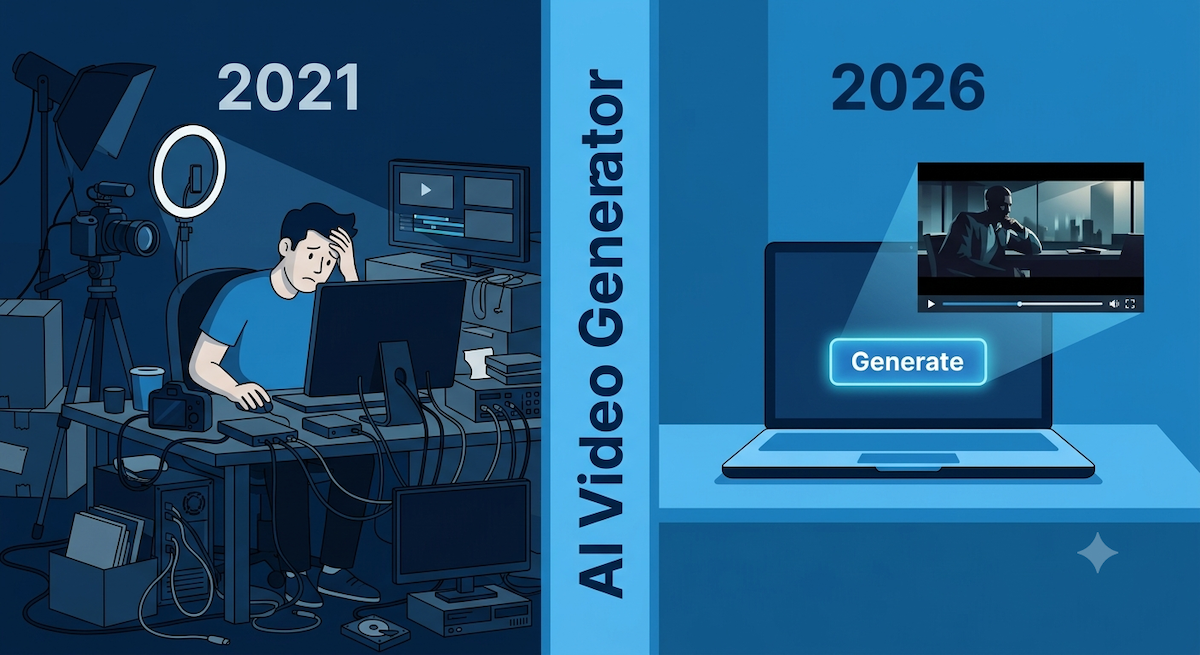
Five years ago, if you wanted a professionally produced marketing video, you needed a director, a camera operator, a lighting rig, a post-production editor, a voiceover artist, a studio, and somewhere between $5,000 and $50,000. Oh, and about three weeks of your life you’ll never get back.
Today? You type a sentence. Hit generate. Get a video.
That’s not hype — that’s the actual state of AI video generation in 2026. But “type a sentence, get a video” is a little like saying “turn some flour and water into a croissant. ” Technically true, deeply incomplete. The real story — how these systems actually work, what’s happening under the hood when your text becomes a cinematic scene, and why some AI video platforms produce Hollywood-quality output while others produce what looks like a 2009 PowerPoint presentation — is way more interesting.
This guide breaks all of it down. No PhD required. No jargon left unexplained. Whether you’re a marketer trying to justify the budget switch, a YouTuber ready to go faceless, or just someone mildly terrified that AI can now make movies—this is for you.
Section 1: What Is an AI Video Generator, Actually?
Let’s start with the definition that cuts through the noise.
An AI video generator is a software system that takes an input — a text prompt, a script, an audio file, or an image — and produces a fully rendered video as output, using artificial intelligence to handle every production decision in between: what the scenes look like, how characters move, what the voiceover sounds like, how long each shot lasts, and what the overall visual style feels like.
What makes it meaningfully different from a video template tool? Three things:
- Generative output: AI video generators create original visual content. They’re not pulling clips from a stock library and dropping your text over them. The frames are synthesized—invented—by a neural network.
- End-to-end automation: A good AI video platform handles the entire production pipeline — scene composition, visual generation, voiceover synthesis, background music, and timing.
- Natural language control: You direct the AI in plain English. “Make it warmer. Add a voiceover in a British accent. Keep the character consistent across scenes.” These aren’t settings you dial—they’re instructions you type.
Section 2: The Technology Under the Hood (Without the PhD)
Here’s the part where most articles either skip straight to the tool comparison or drop terms like “latent diffusion transformer” and assume you’ll figure it out. We’re going to do neither. Bear with us—this part is actually kind of wild.
Think of it like reversing a shredder
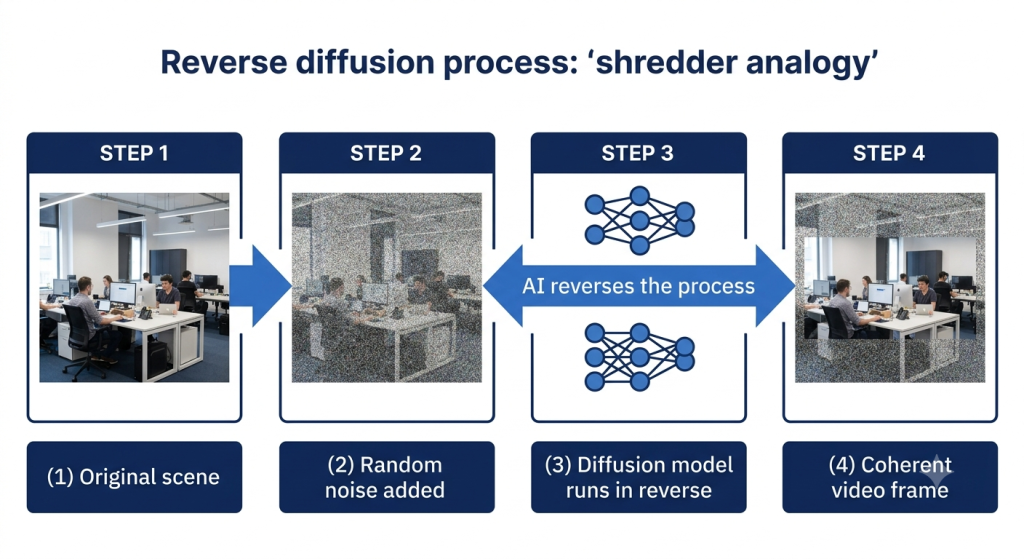
Imagine you take a perfect photograph and run it through a shredder — but instead of tearing it into strips, you progressively add random noise to it, pixel by pixel, until the whole image is just static. Pure, meaningless noise.
Now imagine you could teach a neural network to run that process in reverse. You give it a pile of static — random noise — and it gradually, step by step, de-noises it into a coherent image. That’s the core mechanic of a diffusion model.
Now extend that to video—not just a single image, but 24 images per second, where objects move, lighting changes, and characters blink—and you have the fundamental challenge of AI video generation. Every frame needs to look right. And every frame needs to look right relative to the frames around it.
The technical term for this challenge is temporal consistency. Keeping a character’s jacket the same shade of blue in frame 14 as it was in frame 1. Making sure the coffee cup doesn’t randomly jump two inches between shots. Ensuring the lighting evolves naturally as the sun moves across a scene. This is what makes AI video so much harder than AI image generation — and why the technology took years longer to get good.
Diffusion transformers: the architecture that changed everything
The current generation of AI video generators — including the models powering platforms like Steve AI — is built on an architecture called a diffusion transformer (DiT). Understanding why this matters requires a quick history lesson, but it’s worth it.
Early AI video models used a backbone called a U-Net—a convolutional neural network architecture that worked but didn’t scale well. You’d hit a wall regardless of how much hardware you threw at it.
In 2023, researchers William Peebles and Saining Xie published “Scalable Diffusion Models with Transformers,” replacing the U-Net backbone with a transformer (the same architecture behind large language models like GPT). This single paper became the ancestor of nearly every major AI video model shipping in 2026: Sora, Veo, Kling, Seedance, Runway Gen-4, and the models underlying Steve AI’s generative video mode.
MIT Technology Review described it in December 2025: “The latest wave of video generation models are latent diffusion transformers. They start from random noise across many frames at once and refine it step-by-step into a coherent clip—guided by your prompt encoded by a text model.”
Why does this architecture matter for you as a creator? Because transformers understand relationships—between words in a sentence, between pixels in a frame, and between frames across time. When you write a prompt that says “the character walks toward the camera, the sun setting behind her, warm golden light,” a diffusion transformer understands that “golden light” should affect the character’s skin tone, the background, the lens flare, and the color grading of every frame—not just the sky.
The three-layer production stack
Production teams working with AI video at scale in 2026 have converged on a three-layer architecture:
- Layer 1 — Storyboard: Your text prompt is structured into scenes and visual targets. This is where your script becomes a shot list.
- Layer 2 — Generation: The diffusion transformer produces actual video frames. This is the computationally expensive step — thousands of iterations of noise-to-signal conversion.
- Layer 3 — Orchestration: Clips are chained together, character references maintained across shots, audio synced, and the finished video assembled.
Steve AI handles all three layers within a single workflow—which is why Steve AI output is more consistent and cinematic than tools that skip Layer 3 and hand you a pile of disconnected clips.
Section 3: The Three Types of AI Video (And When to Use Each)
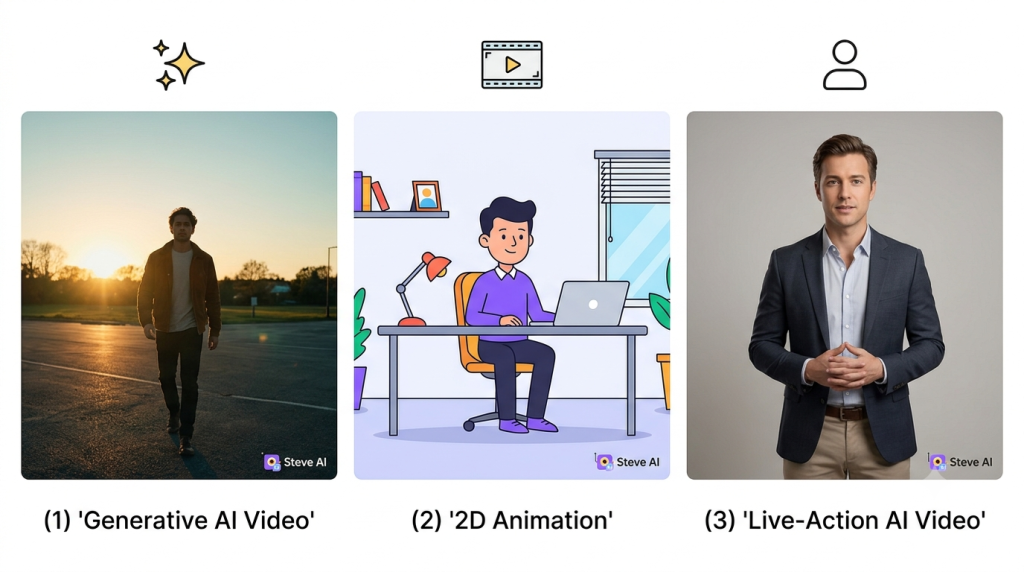
Here’s something most AI video explainers get wrong: they treat “AI video” as a single thing. It isn’t. There are three meaningfully distinct types of AI video output, each powered by different technology, producing different aesthetics, and suited to different use cases.
Steve AI is one of the few platforms that offers all three. Here’s how to think about them:
| Video Type | What It Looks Like | Best For |
| Generative AI Video | Photorealistic or stylized footage synthesized frame-by-frame. Cinematic B-roll, nature scenes, product showcases, and lifestyle content. | Brand storytelling, YouTube intros, premium ad creative, social content where visual quality is the point |
| 2D Animation | Stylized animated characters and environments. Explainer video aesthetics, illustrated brand characters, educational content. | Explainers, eLearning, kids’ content, startup brand videos, scenarios where realism would feel wrong |
| Live-Action AI Video | Realistic footage of people and environments without a camera. AI-generated human presenters and product walkthroughs in a talking-head style. | Corporate comms, product demos, training videos, marketing where a human presence builds trust |
The honest truth: most AI video platforms ask you to pick one lane and stay in it. Steve AI’s multi-mode architecture means you’re not stuck choosing, and you can mix styles within a single project when it makes creative sense.
Section 4: How Steve AI Turns Your Text Into a Video (Step by Step)
This is where theory meets practice. Here’s exactly what happens from the moment you open Steve AI to the moment you export a finished video.
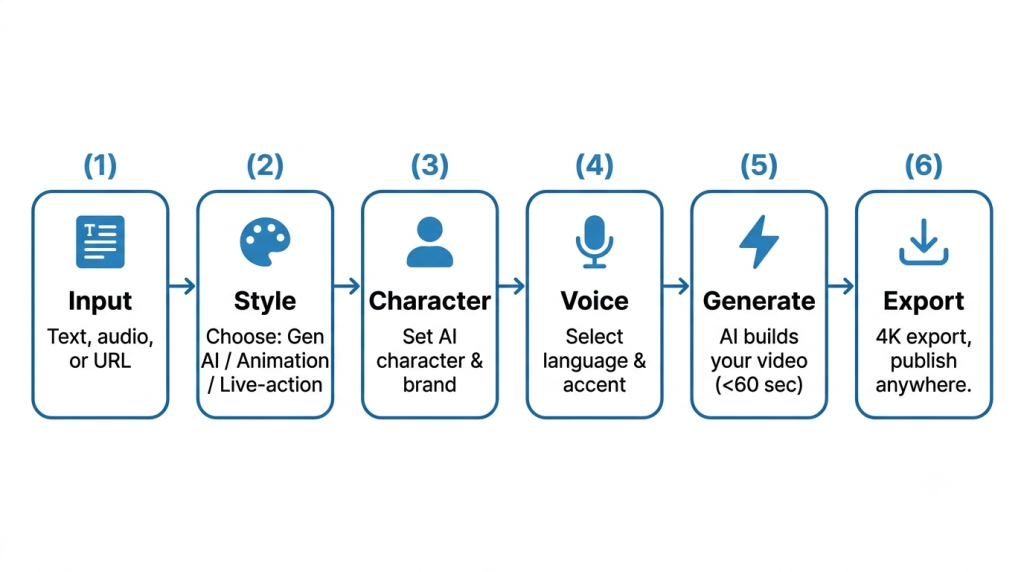
Step 1: You provide the input
Steve AI accepts three input types:
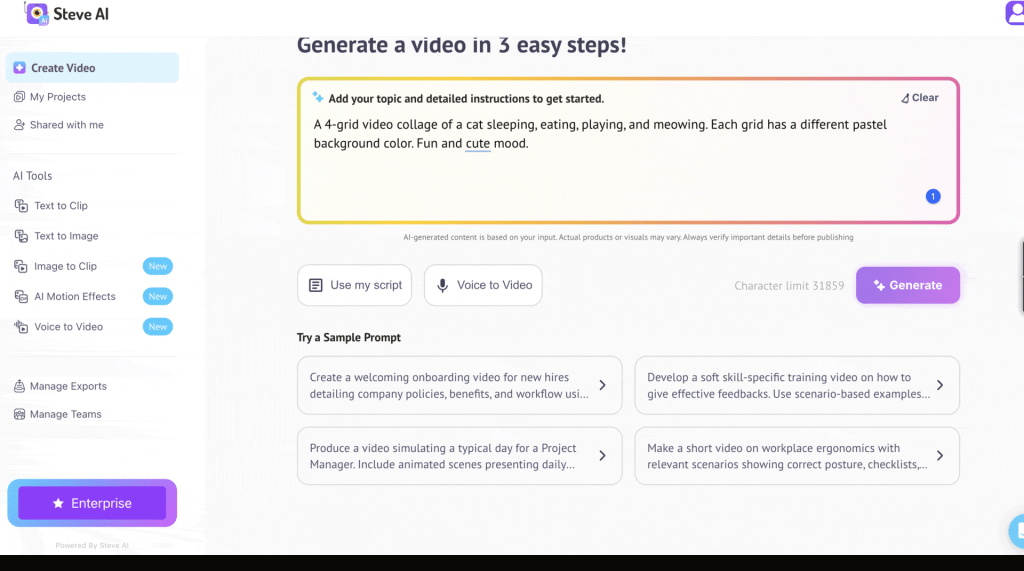
- Text prompt or script: Type a prompt or paste a full script. Steve AI’s AI script assistant can generate a script from a topic if you’re starting from scratch.
- Audio file: Upload a podcast episode, voice recording, or narration track. Steve AI analyzes the audio, generates a transcript, and builds a synchronized video around the spoken content.
- Existing content: Blog posts, URLs, slide decks. Steve AI extracts the key narrative and converts it to video automatically.
Step 2: Choose your video style and output format
Generative AI video, 2D animation, or live-action. You also set the output format—landscape for YouTube, square for Instagram, and vertical for TikTok and Reels—and target duration. Steve AI generates at the correct aspect ratio from the start, not as an afterthought crop.
Step 3: Set up your AI character
For videos featuring a consistent AI presenter or narrative character, you configure them here. Steve AI’s character system maintains visual consistency — same face, same style, same personality cues — across every scene in a series. This is the feature that makes faceless YouTube channels actually work at scale. Your viewers recognize your AI host the same way they’d recognize a human one.
Step 4: Voiceover selection
Steve AI’s multilingual voiceover engine covers dozens of languages with region-specific accents. The distinction between ‘Spanish’ and ‘Mexican Spanish’ or ‘British English’ and ‘Southern American English’ is meaningful for audience trust. You can also upload your own voice recording and let Steve AI sync it to the generated visuals automatically.
Step 5: Generate, review, and refine
Steve AI generates the full video — typically within 60 seconds for most formats. The editor lets you swap individual scenes, adjust timing, change voiceover tone, or regenerate specific sections without starting over. Traditional video means reshooting. Steve AI means regenerating a scene in under a minute.
Step 6: Export in 4K and publish
Full 4K export, commercially licensed output. Steve AI formats the video correctly for the target platform—YouTube’s encoding requirements differ from TikTok’s, and getting this wrong costs you quality. Steve AI handles it automatically.
| ⚡ Real-world time comparison: Traditional 60-second marketing video: 13 days average production time, $4,500+ average cost. Same video with Steve AI: 27 minutes. Source: vidBoard.ai / Zebracat, 2026. |
Section 5: What Makes AI Video Good (vs. Just Fast)
Speed is nice. But if your AI video looks like it was generated during a power outage, speed is irrelevant. Here’s what separates great AI video from mediocre AI video.
1. Temporal consistency
This is the biggest quality differentiator in AI video right now. Temporal consistency means that objects, characters, and environments behave logically across frames. The table doesn’t drift. The character’s hair doesn’t change color between sentences. The shadow falls in the right direction throughout the scene.
Cheap AI video tools fail here constantly — you’ve seen the videos where someone’s hand melts into the desk or a coffee mug teleports three inches to the left between cuts. Modern diffusion transformer architectures have gotten dramatically better at this, but prompt quality still matters.
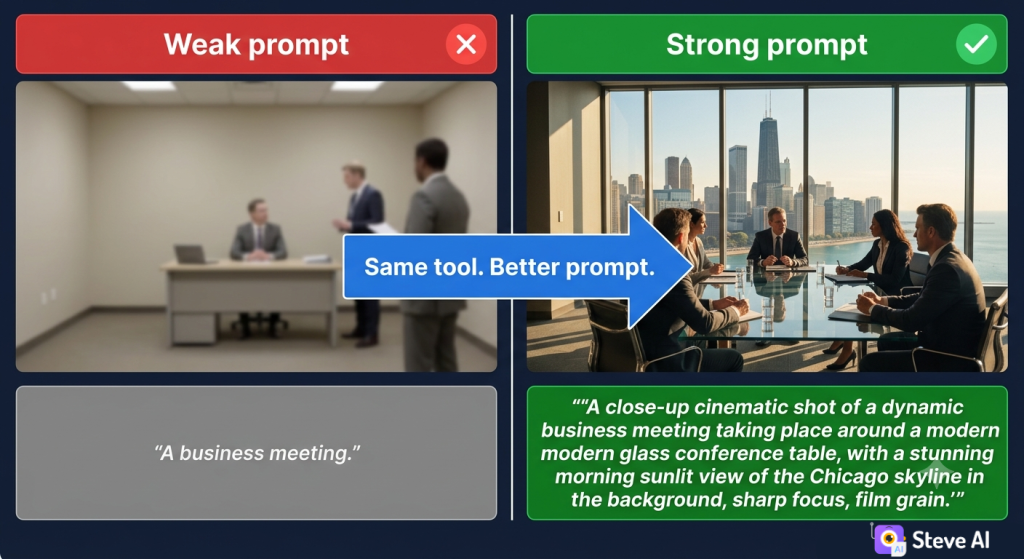
2. Prompt specificity
The biggest mistake new AI video users make is vague prompts. “A business meeting” will generate something generic. “A tense quarterly review meeting, three executives around a glass-topped conference table, the Chicago skyline through floor-to-ceiling windows, overcast morning light, and a close-up on the presenter in a tense quarterly review meeting will generate something cinematic.
3. Character consistency
For any video series, character consistency creates brand recognition. Steve AI’s character system stores your AI presenter’s visual parameters and applies them across every scene, every video, every time. This is what lets solo creators build a ‘faceless channel’ that still feels personal.
4. Audio-visual sync
Nothing breaks immersion faster than a voiceover that’s slightly ahead of or behind the visuals. Steve AI’s synchronization engine aligns generated visuals to the audio track with precision—whether the audio is AI-generated or uploaded from an external recording.
5. Output format intelligence
A video exported for YouTube and a video exported for TikTok are not the same file. Frame rate, aspect ratio, bitrate, encoding — platform algorithms reward native format compliance. Steve AI’s export engine applies platform-specific optimization automatically.
Section 6: Who Uses AI Video Generators (and What They’re Making)
124 million+ Monthly active users across AI video platforms as of January 2026. Source: Ngram.com / industry-aggregated data |
Marketers and content teams
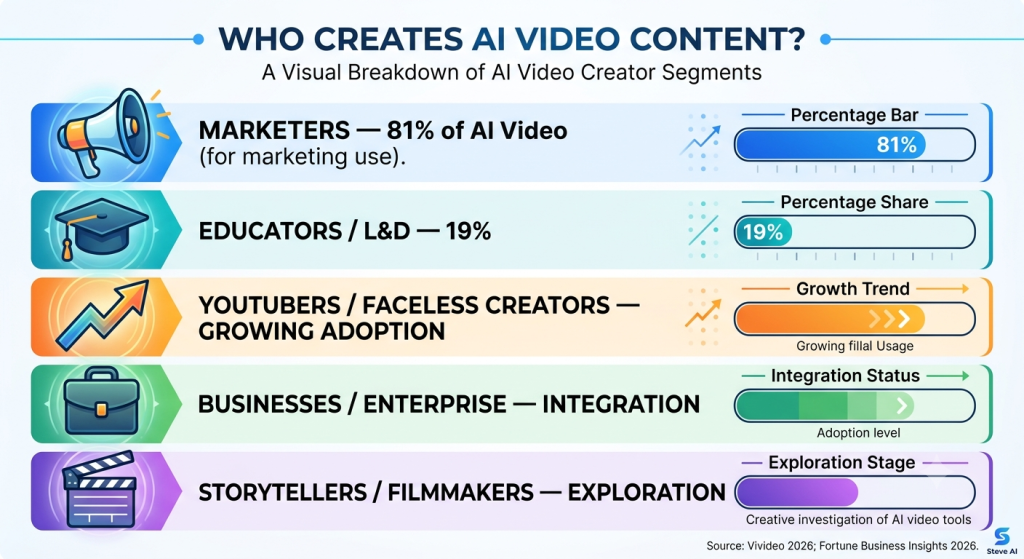
Marketing is the largest segment by volume—about 81% of AI-generated videos are made for marketing purposes (Vivideo, 2026). The use cases cluster around three workflows: social media content at scale, ad creative testing, and product video for e-commerce listings.
The e-commerce data is striking: brands using AI-generated product videos saw a 156% increase in listing engagement compared to photo-only listings (Vivideo, 2026). That’s not a marginal improvement — it’s a conversion rate transformation.
YouTubers and faceless content creators
The faceless YouTube channel ecosystem has been completely reshaped by AI video. Creators who once needed a camera, ring light, and the confidence to appear on screen now build entire channel libraries through text prompts. Steve AI’s character system is purpose-built for this workflow—consistent AI presenter, repeatable aesthetic, and 10 videos in the time it used to take to film one.
One practical reality worth knowing: YouTube has been explicit that AI-generated content is monetizable, provided it meets content quality and originality standards. Faceless channels earned between $12,000 and $120,000 annually in our analysis of top creator data (Steve AI Blog, 2025).
Educators and L&D professionals
Education and e-learning account for 19% of all AI-generated video content—the second-largest category after marketing (Vivideo, 2026). AI reduces eLearning video production costs by 50–80% compared to traditional studio production (Synthesia internal data). And a corporate training video that once required separate studios for Spanish, French, and Mandarin versions can now be produced in all three simultaneously, with region-specific accents, from a single Steve AI project.
Businesses and enterprise teams
Enterprise adoption has shifted from pilot programs to full production workflows in 2026. Primary use cases: internal communications, product demo videos, and onboarding content that can be updated without a production call. Steve AI is GDPR-compliant and ISO 27001-certified — the security posture that makes it viable for Fortune 500 procurement reviews.
Section 7: The AI Video Market in 2026 — What the Numbers Actually Say
A lot of AI market data gets thrown around carelessly. Here’s our best reconciliation of credible published figures, with direct sources you can verify:
| Metric | Figure | Source |
| Global AI video market (2025) | $716.8 million | https://www.fortunebusinessinsights.com/ai-video-generator-market-110060 |
| Projected market (2026) | $847M – $946M | https://www.grandviewresearch.com/industry-analysis/ai-video-generator-market-report |
| Projected market (2034) | $3.35 billion | https://www.ngram.com/blog/industry-news/ai-video-statistics-2026 |
| CAGR (2026–2034) | 18.8% – 20.3% | https://almcorp.com/blog/ai-video-generators/#elementor-toc__heading-anchor-0 |
| Text-to-video segment CAGR | 38.6% | |
| Monthly active users | 124 million+ | |
| AI vs. traditional: cost | 91% cheaper | |
| Avg. production time (60-sec video) | 13 days → 27 minutes | |
| Global savings switching to AI (2025) | $3.7 billion | |
| AI video growth vs. traditional editing | 3.6× faster | |
| North America market share | 41% | |
| Video marketers using AI tools | 63% | |
| AI video generation volume growth (2024→2026) | 840% |
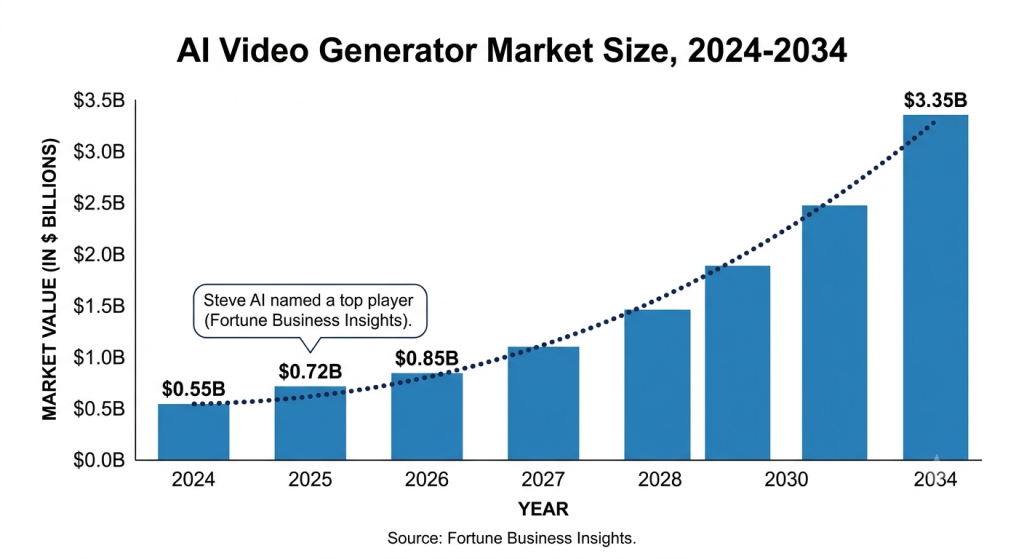
A note on market sizing: different research firms use different scope definitions, which is why you’ll see figures ranging from $400M to $18B for the same market in the same year. We’ve anchored to Fortune Business Insights and Grand View Research as the most consistently cited sources.
Section 8: Common Myths About AI Video Generators
Myth 1: “AI video looks fake and robotic”
Vivideo’s 2026 blind testing found that 73% of viewers couldn’t distinguish high-quality AI-assisted from traditional video. HeyGen’s Avatar IV technology has produced outputs that colleagues in controlled tests couldn’t identify as AI-generated. The caveat: the gap between the best and worst AI videos is enormous. Quality varies dramatically by platform, prompt quality, and use case.
Myth 2: “You need technical skills”
The entire value proposition of platforms like Steve AI is that you don’t. If you can write an email, you can write an AI video prompt. The interface is built around plain-English direction. The closest you’ll get to a skill requirement is learning to write more specific prompts, which is really just learning to communicate more clearly.
Myth 3: “AI video is only for short clips”
Early AI video models were limited to 3–10-second clips. In 2026, Kling 3.0 produces 10-second clips with excellent temporal consistency, and production-grade workflows chain these clips together to produce full videos of any length. The “short clip” limitation is a 2023 problem, not a 2026 one.
Myth 4: “AI video will replace videographers”
The data points in a more nuanced direction. Demand for AI video creators on Fiverr surged 66% in H2 2025 (Ngram, 2026). What AI is replacing is repetitive, formula-driven production. What it’s not replacing — and likely won’t for a while — is creative direction, brand strategy, and the judgment that separates great creative from forgettable creative.
Section 9: How to Write Prompts That Actually Work
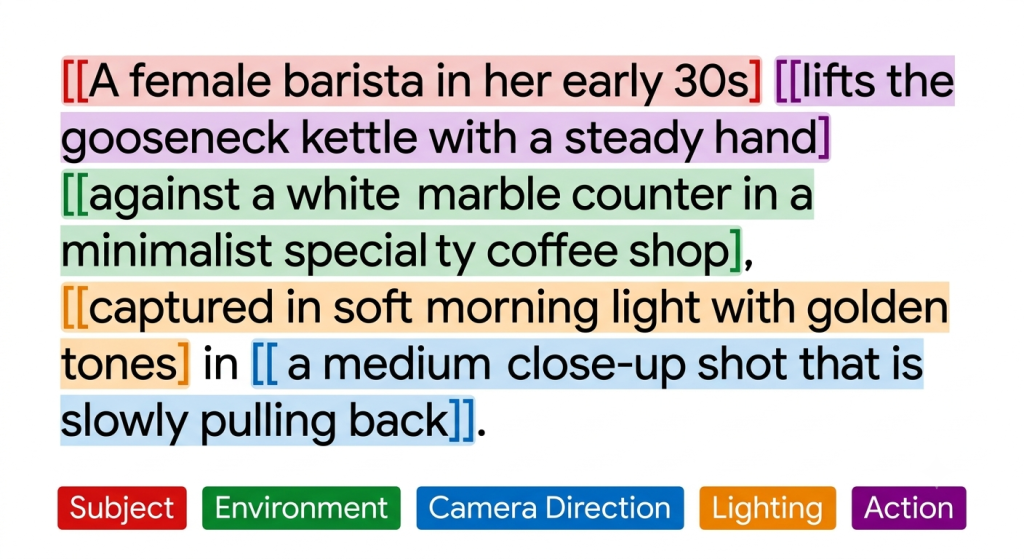
Every strong AI video prompt answers five questions:
- What is in the scene? Subjects, objects, environment.
- How does it look? Lighting, color, style, time of day.
- Where is the camera? Shot type and movement.
- What is the mood? Tone, energy, emotional register.
- What happens? Motion, action, change.
| ✏️ Before vs. After WEAK: “A person making coffee” STRONG: “A female barista in her early 30s, behind a white marble counter in a minimalist specialty coffee shop, preparing a pour-over. Soft morning light filters through oversized windows. The camera holds at a medium close-up as she lifts the gooseneck kettle with a steady hand. Warm golden tones, quiet focus. The only motion is the water and her hands.” |
Common prompt mistakes (and how to fix them)
- Vague scene descriptions: “Make it look good” tells the AI nothing. Specify the aesthetic reference: “cinematography in the style of a premium car commercial.”
- Conflicting instructions: “Dark and moody with bright cheerful colors” produces noise. Pick one emotional direction per scene.
- No camera direction: Without explicit camera instructions, AI defaults to static shots. Say what you want: pan left, slow zoom in, handheld.
- Underspecified characters: “A businessperson” is too vague. Describe them the way you’d describe a casting brief.
Section 10: What’s Next — AI Video in 2026 and Beyond
Native audio generation is becoming standard
ByteDance’s Seedance model pioneered simultaneous audio-visual generation—where audio and video are produced together in a single pass, not layered sequentially, with millisecond-level phoneme-to-viseme alignment. Other platforms are racing to match it.
Image-to-video reshaping the workflow
The production paradigm is shifting from ‘text only’ to ‘image plus text. Creators generate a reference image first — using a tool like Midjourney—then use that as an anchor for video generation. The result is dramatically more consistent character identity across clips.
Longer generation windows
The current ceiling for single-generation video length is roughly 25 seconds. The trajectory is toward 60 seconds and eventually 3+ minutes without the quality degradation that comes from stitching clips. When that capability is widespread, the workflow for a 5-minute YouTube video will look very different.
Enterprise AI video agents
Beyond individual video creation, 2026 is seeing the emergence of what resource.digen.ai calls ‘autonomous video agents’ — systems that analyze a brand’s identity, monitor market trends, and proactively generate content. This is the enterprise use case attracting the most investment right now.
Section 11: Steve AI vs. the Category — What Makes It Different
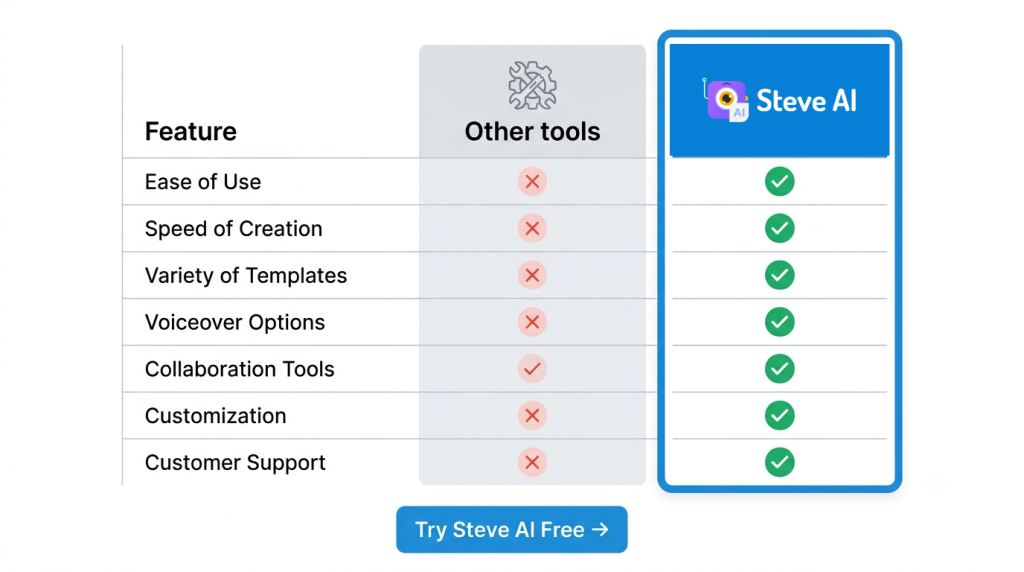
There are a lot of AI video platforms. Here’s an honest breakdown of where Steve AI fits — and what genuinely sets it apart:
| Capability | Most AI video tools | Steve AI |
| Output types | One mode: generative OR avatar OR animation | All three: generative AI video + 2D animation + live-action |
| Consistent AI characters | Limited or no cross-video consistency | Built-in character system with full visual consistency |
| Multilingual voiceover | English-first, limited language support | Multiple languages with region-specific accents |
| Audio-to-video | Not supported | Full audio upload → synchronized video generation |
| Script assistant | Basic or none | AI-assisted script generation built into workflow |
| Export optimization | Generic export settings | Platform-specific formatting for YouTube, TikTok, LinkedIn, etc. |
| Security / compliance | Varies widely | GDPR-compliant, ISO 27001 certified |
| Use case range | Narrow: one audience segment | Marketers, YouTubers, educators, businesses, storytellers |
For a full comparison, see our side-by-side breakdown of the 10 fastest AI video generators — including where Steve AI leads and where other tools have specific strengths.
Section 12: Getting Started With Steve AI — Your First Video in 15 Minutes
Enough theory. Here’s how to actually make something.
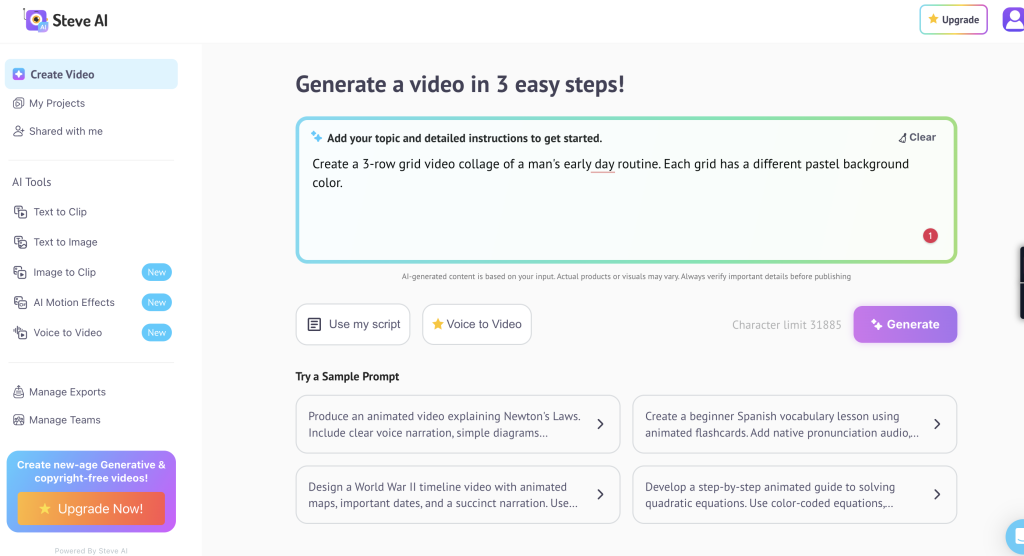
- Go to steve.ai and create a free account.
- Click ‘Create new video’ and select your input type: text prompt, script, or audio file.
- Write or generate your script. Use the five-question prompt framework from Section 9 to describe your opening scene.
- Choose your video style: generative AI, 2D animation, or live-action.
- Set your output format (landscape/square/vertical) and target platform.
- If your video features a recurring character, set them up in the character panel.
- Select your voiceover language and accent.
- Click generate. Review the output. Use the scene editor to swap or adjust individual scenes.
- Export in your target format and publish.
Your first video will probably not be perfect. The first time anyone drives a car, they stall at a light. By the fifth video, you’ll have a feel for how to prompt for the output you want — and that’s when the platform becomes genuinely transformative.
Frequently Asked Questions
What is an AI video generator?
An AI video generator is software that converts text, scripts, or audio into fully produced videos using artificial intelligence — handling scene generation, voiceover synthesis, character animation, and final export without requiring a camera, crew, or editing skills.
How does AI text-to-video work?
AI text-to-video uses a diffusion transformer neural network trained on large datasets of video and text. Your text prompt is encoded, and the model progressively refines random noise into coherent video frames—maintaining temporal consistency (keeping subjects stable across frames) and aligning visuals to the semantic meaning of your words. For a deeper technical breakdown, see MIT Technology Review’s explanation.
Is AI-generated video good enough for professional use?
Yes, for most commercial applications. 73% of viewers cannot distinguish high-quality AI-assisted from traditionally produced footage (Vivideo, 2026). The qualifier is platform and prompt quality—the best AI video is genuinely professional grade; weaker platforms still have visible artifacts.
How long does it take to create a video with AI?
Most platforms, including Steve AI, generate a 60-second video in under 60 seconds of processing time. End-to-end—from opening the tool to having a publishable video—the industry benchmark is 27 minutes for a typical marketing video (vidBoard.ai / Zebracat, 2026). Compare that to 13 days for a traditionally produced equivalent.
Can AI video be monetized on YouTube?
Yes. YouTube’s official position is that AI-generated content is eligible for monetization under the YouTube Partner Program, provided it meets standard content quality, originality, and advertiser-friendly guidelines. Simply generating generic content without creative input may be flagged as repetitive; original scripting, character development, and editorial judgment keep it monetization-eligible.
What’s the difference between Steve AI and Synthesia or HeyGen?
Synthesia and HeyGen are avatar-first platforms optimized for placing AI presenters on screen to deliver scripted content. Steve AI offers all three output modes (generative AI video, 2D animation, and live-action) alongside consistent AI characters, multilingual voiceover, and audio-to-video conversion in a single workflow. See our full comparison of the fastest AI video generators for a detailed side-by-side.
Is AI-generated video detectable?
Increasingly, yes — content authentication standards like C2PA (Coalition for Content Provenance and Authenticity) are being embedded in AI-generated content by most major platforms. All top AI video tools in 2026 automatically embed metadata identifying content as AI-generated. This transparency standard is becoming the industry norm, not a stigma.
The Bottom Line
AI video generation in 2026 is not a future technology. It’s not a novelty. It’s not a shortcut that produces low-quality output and saves you fifteen minutes.
It’s a fundamental shift in who gets to make professional video—and how fast. The technology has crossed from ‘impressive demo’ to ‘production tool’ for real businesses, real creators, and real audiences. The market crossed $700 million in 2025 and is growing at 3.6× the rate of traditional video software. Over 124 million people are already using it every month.
The question for 2026 isn’t whether you should be using AI video. It’s which workflows you’re going to transform first.
Steve AI is built to answer that question across the full range of creators: marketers, YouTubers, educators, storytellers, and businesses who need professional video at a scale and speed that traditional production simply can’t match. Three output modes, consistent AI characters, multilingual voiceover, and a complete production workflow, all in one platform.
Your first video is waiting. Go make something worth watching. →